arista.avd.cv_deploy
Overview
arista.avd.cv_deploy deploys EOS device configurations and tags to the CloudVision management platform.
Depending on the configured options, the role supports multiple operations:
- Deploys device-specific configurations for one or more devices using the “Static Configuration Studio”.
- Deploys a full hierarchy of containers and configlets using the “Static Configuration Studio”.
- Deploys device and interface Tags for one or more devices.
- Adds missing devices and updates device details for existing devices in the “Inventory & Topology Studio”.
- Creates, builds, submits Workspaces.
- Creates, approves, starts Change Controls.
- Deploys special metadata for CV Pathfinder solution.
Devices will be identified using serial_number, system_mac_address or hostname (in prioritized order).
The available identification depends on the configured AVD variables.
The API to CloudVision is using gRPC over encrypted HTTP/2.
Note
Please note that in case of using CVaaS, the correct regional URL where the CVaaS tenant is deployed must be used
for the cv_server var. The following are the cluster URLs used in production:
| Region | URL |
|---|---|
| United States 1a | www.arista.io |
| United States 1b | www.cv-prod-us-central1-b.arista.io |
| United States 1c | www.cv-prod-us-central1-c.arista.io |
| Canada | www.cv-prod-na-northeast1-b.arista.io |
| Europe West 2 | www.cv-prod-euwest-2.arista.io |
| Japan | www.cv-prod-apnortheast-1.arista.io |
| Australia | www.cv-prod-ausoutheast-1.arista.io |
| United Kingdon | www.cv-prod-uk-1.arista.io |
Warning
URLs without www are not supported.
Limitations
- It is not possible to authenticate with username/password. See the instructions below on how to create a service account on CloudVision.
- This role is only supported on CloudVision as a Service (CVaaS) or “on-prem” CloudVision 2024.1.0 or later.
-
Configuration deployment is based on the “Static Configuration Studio” which was a Beta feature on CloudVision 2024.1.0. Make sure to enable “Studios - End-to-End Provisioning” under Settings, Features.

-
Roadmap
This feature is still under development, so several planned features are not implemented yet.
- Make all timeouts configurable. Current exposed settings have no effect.
- Detect changes in configlets and only update when needed. (Depends on newer API)
- Validate tag labels and values
- Support for assigning change control templates.
- Add automatic testing.
- Add required CloudVision versions once the APIs are generally available.
- Update AVD examples.
- Handle multinode clusters by trying connecting to each one by one.
Example
This basic example will deploy configurations and tags for all devices in the inventory group FABRIC to CVaaS:
- name: Configuration deployment
  hosts: FABRIC # <-- Targeted devices
  connection: local
  gather_facts: false
  tasks:
    - name: Deploy configurations and tags to CloudVision
      ansible.builtin.import_role:
        name: arista.avd.cv_deploy
      vars:
        cv_server: www.arista.io
        cv_token: <insert service_account token here - use Ansible Vault>
The workspace will be built and submitted, and a change control will be created and left in pending approval state.
Role Inputs and Outputs
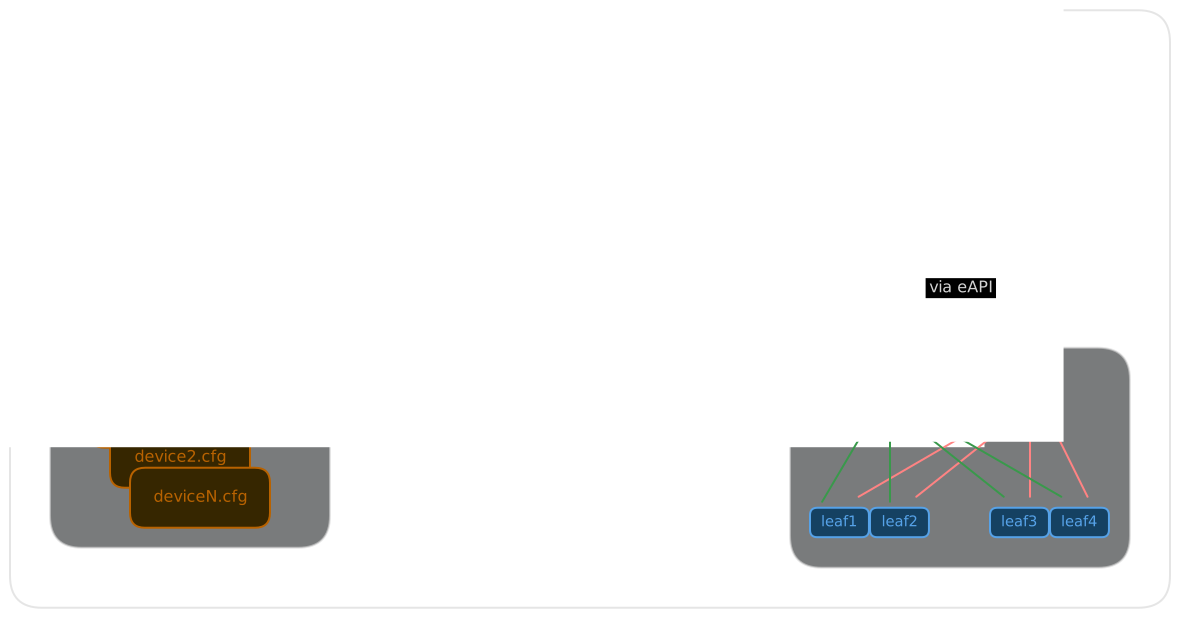
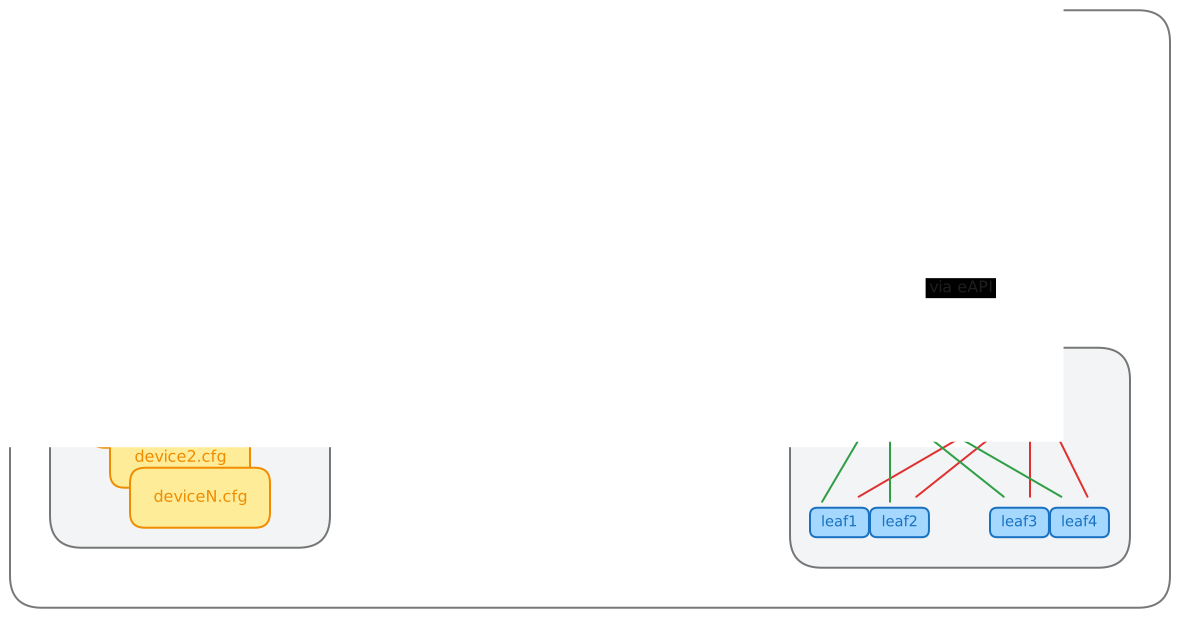
Figure 2 below provides a visualization of the role’s inputs, outputs executed by the role.
Inputs
All cv_* settings described below can be set either as inventory variables, group_vars, host_vars or directly in the playbook task under vars.
CloudVision Server configuration
By default this role will read information about the CloudVision server from the inventory host cloudvision (The name of the host is configurable with cv_inventory_hostname).
all:
  hosts:
    cloudvision:
      ansible_host: <hostname or IP address of CloudVision host. Ex. "www.arista.io" for CVaaS>
      ansible_password: <service account token as defined on CloudVision. This value should be using Ansible Vault>
The CloudVision inventory hostname is configurable.
# Inventory hostname of the CloudVision host.
# This is used to pickup the ansible_host and ansible_password used to connect to CloudVision.
# Each of these can be overridden manually if CloudVision is not part of the inventory.
cv_inventory_hostname: "cloudvision"
It is also possible to define the hostname and token directly without defining the CloudVision server in the inventory.
# Manually override the CV server hostname and token if CloudVision is not part of the inventory.
cv_server: <hostname or IP address of CloudVision host. Ex. "www.arista.io" for CVaaS>
cv_token: <service account token as defined on CloudVision. This value should be using Ansible Vault>
By default the connection to CloudVision requires valid certificates. For test and lab usage the certificate verification can be disabled.
# Verify Certificate for CloudVision (Always use valid certificates for production)
cv_verify_certs: false
For an on-premise CloudVision cluster it is possible to authenticate with username/password instead of a service account token.
The username and password below must be set via variables on the task, play or in the fabric-level group vars. ansible_password and cv_token must not be set.
# Use username/password instead of a service account token for authentication to CloudVision.
cv_username: <username>
cv_password: <password. This value should be using Ansible Vault>
EOS Devices configuration
By default this role will deploy configurations for all hosts targeted by the Ansible “play”.
- name: Configuration deployment
  hosts: FABRIC # <-- Targeted devices
  connection: local
  gather_facts: false
  tasks:
    - name: Deploy configurations and tags to CloudVision
      ansible.builtin.import_role:
        name: arista.avd.cv_deploy
This playbook targets the Ansible inventory group “FABRIC”, so all devices under this group will be used for the deployment.
Tip
It is possible to only deploy to a subset of this group by supplying the --limit <hostname or group>,<hostname or group> flag
to the ansible-playbook command.
It is also possible to manually supply a list of devices.
# Deploy device configs and tags for these devices.
# Defaults to all hosts in the play.
# This means the role must be imported/included in a play targeting only the relevant EOS devices - *not* CloudVision.
cv_devices: [ DC1-L3LEAF1A, DC1-L3LEAF1B ]
Note
The device name is used directly to find the EOS configuration and structured configuration files. This means the device names are case sensitive and must match the file names.
The role will fail if a device is not found on CloudVision. Any workspace created will be abandoned automatically.
Devices with is_deployed: false set as part of AVD Design inputs will be ignored.
It is possible to ignore other missing devices by simply skipping them and continue with the remaining devices.
# If false, the deployment will fail if any devices are missing (excempting devices where 'is_deployed' is set to false).
cv_skip_missing_devices: true
Role behavior configuration
By default the role will
- Create a workspace.
- Push all configurations and tags.
- Unassign tags
- Build and submit the Workspace.
- Fetch and expose errors and warnings raised during the Workspace Build phase.
- Leave any created Change Control in
pending approvalstate.
Warning
When deploying CloudVision Tag assignments, the builtin behavior is to unassign any other tags with the same labels but different values. This is not configurable.
It is possible to unassign any other tag from the devices by setting cv_strict_tags: true.
This may remove tags used for studios and other things, so this is not recommended.
These settings allow modifying the default behavior as needed. The values below are the default values.
# Submit Workspace on deployment. Otherwise the Workspace will be left in "pending" mode.
cv_submit_workspace: true

# Force Workspace submission even if some devices are not streaming.
# If set, configurations will not be validated for non-streaming devices.
cv_submit_workspace_force: false

# Fetch and expose Workspace build warnings.
# Suppress specific warnings based on pre-defined options or custom regex fullmatch pattern(s).
cv_workspace_build_warnings_enabled: true
cv_workspace_build_warnings_suppress_patterns: []
cv_workspace_build_warnings_suppress_portfast: false

# Approve, start and wait for the Change Control to Complete. Otherwise the Change Control will be left in "pending approval" mode.
cv_run_change_control: false

# Set the name of the created Workspace. By default this will be "AVD <date and time>"
# cv_workspace_name: <str>

# Set the description of the created Workspace.
# cv_workspace_description: <str>

# Set the name of the created Change Control. By default this will be auto generated by CloudVision based on the workspace name.
# cv_change_control_name: <str>

# Set the description of the created Change Control.
# cv_change_control_description: <str>

# Remove any tags on the devices and interfaces not specified by AVD.
# WARNING: This may remove tags used for studios and other things, so this is *not* recommended.
# NOTICE: For tags set by AVD any other tags with the same label will _always_ be removed. This is not configurable.
cv_strict_tags: false

# Set the template to be used to generate the configlet names in CloudVision Static Config Studio.
cv_configlet_name_template: "AVD-${hostname}"

# If true, detailed deployment results will be registered into 'cv_deploy_results' variable.
# Otherwise only the basic result like 'failed', 'warnings' and 'errors' are registered.
# There is a small performance impact on this, which is why it is not registered by default.
cv_register_detailed_results: false

# Time to wait for a Workspace to build. Depending on the scale this can be adjusted.
cv_workspace_build_timeout: 300
Advanced role configuration
The optional settings below provide direct control over Workspace and Change Control states.
# Set the ID of the created Workspace. If a workspace with the same ID already exists, it must be in the 'pending' state.
# cv_workspace_id: <str>

# Set the requested state for the Workspace.
# Accepted values: "pending", "built", "submitted", "abandoned" or "deleted".
# cv_workspace_requested_state: <str>

# Set the requested state of the created Change Control.
# Accepted values: "pending approval", "approved", "running" or "completed".
# cv_change_control_requested_state: <str>
cv_workspace_id
By default, cv_deploy auto-generates new workspace ID on each run. Setting cv_workspace_id instructs the role to use a specific ID instead. If a workspace with that ID already exists in CloudVision and is in pending state, it will be reused (this may be useful for resuming an interrupted deployment). If the existing workspace is in any other state, the role will raise an error. If workspace with that ID does not yet exist - it will be created.
flowchart LR
    A([cv_deploy]) --> B{cv_workspace_id\nis set?}
    B -- No --> C[auto-generate\nWorkspace ID]
    B -- Yes --> D{Workspace with\nrequested ID exists?}
    D -- No --> E[Create Workspace\nwith requested ID]
    D -- Yes --> G{Workspace is in\nPENDING state?}
    G -- Yes --> F[Reuse existing\nWorkspace]
    G -- No --> I([Raise exception])
cv_workspace_requested_state
By default, the Workspace state is controlled by the cv_submit_workspace key. Setting cv_workspace_requested_state bypasses cv_submit_workspace entirely and applies the specified state directly. This is useful for workflows that need precise control over the target state of the Workspace.
flowchart LR
    A([cv_deploy]) --> B{"cv_workspace_requested_state\nis set?"}
    B -- Yes --> C["Workspace requested state =\ncv_workspace_requested_state"]
    B -- No --> D{cv_submit_workspace?}
    D -- "True (default)" --> E["Workspace requested state =\n submitted"]
    D -- False --> F["Workspace requested state =\n built"]
cv_change_control_requested_state
By default, the Change Control state is controlled by cv_run_change_control. Setting cv_change_control_requested_state bypasses cv_run_change_control entirely. Only applicable when the requested state of the Workspace is submitted.
flowchart LR
    A(["Workspace requested state\n==\nsubmitted?"]) -- Yes --> B{cv_change_control_requested_state set?}
    A -- No --> G["Change Control is not created"]
    B -- Yes --> C["Change Control requested state\n=\ncv_change_control_requested_state"]
    B -- No --> D{"cv_run_change_control?"}
    D -- True --> E["Change Control requested state\n=\ncompleted"]
    D -- "False (default)" --> F["Change Control requested state\n=\npending approval"]
Static Configuration Studio deployment
In addition to deploying device-specific configurations, the role allows for the deployment of a full hierarchy of containers and configlets to the CloudVision “Static Configuration Studio”. This is controlled by the cv_static_config_manifest variable:
cv_static_config_manifest:

  # A list of dictionaries defining configlets to be created in the Configlet Library.
  # Configlet names must be unique across all defined configlets.
  configlets:
    - name: <str>
      file: <str>

  # A list of dictionaries defining the root containers in the Static Configuration hierarchy.
  # Container names must be unique among sibling containers (at the same level).
  containers:
    - name: <str>
      description: <str, optional>
      tag_query: <str>
      match_policy: <str, default="match_all", choices=["match_all", "match_first"]>
      configlets:
        - name: <str>
      sub_containers:
        - name: <str>
          description: <str, optional>
          tag_query: <str>
          match_policy: <str, default="match_all", choices=["match_all", "match_first"]>
          configlets:
            - name: <str>
          sub_containers: <list of containers>
Root Containers Order
When initially deploying or adding new root containers, the role places its managed root containers to the top of the Studio container tree. Please be aware that this automated ordering may displace any containers you have manually arranged.
Manifest-Only Deployment
To manage the Static Configuration Studio independently, you can run a “manifest-only” deployment. Simply provide an empty list for cv_devices (cv_devices: []).
When cv_devices is empty, the role skips all device-specific operations (like configlet generation and tagging) and only deploys the content of cv_static_config_manifest.
Role default input directories
When using the standard AVD workflow, the EOS device configurations and AVD structured configurations are read from files generated by the arista.avd.eos_designs and arista.avd.eos_cli_config_gen roles.
The directories are configured with the same variables as for the other AVD roles:
# Roles Defaults - directories

# Root directory where to find AVD output structure
root_dir: '{{ inventory_dir }}'

# AVD configurations output
# Main output directory
output_dir_name: 'intended'
output_dir: '{{ root_dir }}/{{ output_dir_name }}'

# Output for structured YAML files:
structured_dir_name: 'structured_configs'
structured_dir: '{{ output_dir }}/{{ structured_dir_name }}'

# EOS Configuration Directory name
eos_config_dir_name: 'configs'
eos_config_dir: '{{ output_dir }}/{{ eos_config_dir_name }}'

# Output directory for temporary files.
# Contains templated and validated inputs used by the 'cv_deploy' role.
cv_deploy_tmp_dir: '{{ output_dir }}/tmp_cv_deploy'
Device metadata from structured configuration
cv_deploy uses the metadata key from each device structured configuration to get the following information:
- Device identification:
serial_numberandsystem_mac_address - Deployment status:
is_deployed - CloudVision tags:
cv_tags(device and interface tags) - CV Pathfinder metadata:
cv_pathfinder
No additional configuration is required when using the standard AVD workflow (eos_designs → eos_cli_config_gen → cv_deploy).
Using cv_deploy without eos_designs
For users not using eos_designs in their workflow, the cv_deploy role can be used independently by providing the required structured configuration variables directly as Ansible variables.
To use Ansible variables instead of structured configuration files, set the role variable read_structured_config_from_file to false.
The following variables can then be set per device:
| Variable | Type | Required | Default | Value Restrictions | Description |
|---|---|---|---|---|---|
| is_deployed | Boolean | True |
When set to false, the device will be skipped from all operations performed by the cv_deploy role. |
||
| serial_number | String | Serial number of the device used to identify the device in CloudVision. Takes precedence over system_mac_address and inventory_hostname.Device identification precedence: 1. serial_number (highest priority)2. system_mac_address3. inventory_hostname (lowest priority, used only if neither of the above is set) |
|||
| system_mac_address | String | System MAC address of the device used to identify the device in CloudVision. Should match the MAC address shown in “show version” on the device. Used when serial_number is not set.Device identification precedence: 1. serial_number (highest priority)2. system_mac_address3. inventory_hostname (lowest priority, used only if neither of the above is set) |
|||
| cv_device_tags | List, items: Dictionary | List of CloudVision device tags to be assigned to this device. | |||
| - name | String | Required | |||
| value | String | Required | |||
| cv_interface_tags | List, items: Dictionary | List of CloudVision interface tags to be assigned to interfaces on this device. | |||
| - interface | String | Required | |||
| tags | List, items: Dictionary | ||||
| - name | String | Required | |||
| value | String | Required | |||
| cv_pathfinder_metadata | Dictionary | Metadata used for CV Pathfinder visualization on CloudVision. | |||
| role | String | ||||
| region | String | ||||
| zone | String | ||||
| site | String | ||||
| vtep_ip | String | ||||
| ssl_profile | String | ||||
| address | String | ||||
| pathfinders | List, items: Dictionary | ||||
| - vtep_ip | String | Required | |||
| interfaces | List, items: Dictionary | ||||
| - name | String | ||||
| carrier | String | ||||
| circuit_id | String | ||||
| pathgroup | String | ||||
| public_ip | String | ||||
| pathgroups | List, items: Dictionary | ||||
| - name | String | Required | |||
| carriers | List, items: Dictionary | ||||
| - name | String | ||||
| imported_carriers | List, items: Dictionary | ||||
| - name | String | ||||
| regions | List, items: Dictionary | ||||
| - id | Integer | ||||
| name | String | ||||
| zones | List, items: Dictionary | ||||
| - id | Integer | ||||
| name | String | ||||
| sites | List, items: Dictionary | ||||
| - id | Integer | ||||
| name | String | ||||
| location | Dictionary | ||||
| address | String | ||||
| vrfs | List, items: Dictionary | ||||
| - name | String | ||||
| vni | Integer | ||||
| avts | List, items: Dictionary | ||||
| - constraints | Dictionary | ||||
| jitter | Integer | ||||
| latency | Integer | ||||
| lossrate | String | ||||
| hop_count | String | ||||
| description | String | ||||
| id | Integer | ||||
| name | String | ||||
| pathgroups | List, items: Dictionary | ||||
| - name | String | ||||
| preference | String | ||||
| application_profiles | List, items: String | ||||
| - <str> | String | ||||
| internet_exit_policies | List, items: Dictionary | ||||
| - name | String | Required | |||
| type | String | Required | |||
| city | String | Required | |||
| country | String | Required | |||
| upload_bandwidth | Integer | ||||
| download_bandwidth | Integer | ||||
| firewall | Boolean | Required | |||
| ips_control | Boolean | Required | |||
| acceptable_use_policy | Boolean | Required | |||
| vpn_credentials | List, items: Dictionary | Required | |||
| - fqdn | String | Required | |||
| vpn_type | String | Required | |||
| pre_shared_key | String | Required | |||
| tunnels | List, items: Dictionary | Required | |||
| - name | String | Required | |||
| preference | String | Required | |||
| endpoint | Dictionary | Required | |||
| ip_address | String | Required | |||
| datacenter | String | Required | |||
| city | String | Required | |||
| country | String | Required | |||
| region | String | Required | |||
| latitude | String | Required | |||
| longitude | String | Required | |||
| applications | Dictionary | ||||
| profiles | List, items: Dictionary | ||||
| - name | String | ||||
| builtin_applications | List, items: Dictionary | ||||
| - name | String | ||||
| services | List, items: String | ||||
| - <str> | String | ||||
| user_defined_applications | List, items: Dictionary | ||||
| - name | String | ||||
| categories | List, items: Dictionary | ||||
| - category | String | ||||
| services | List, items: String | ||||
| - <str> | String | ||||
| transport_protocols | List, items: String | ||||
| - <str> | String | ||||
| categories | Dictionary | ||||
| builtin_applications | List, items: Dictionary | ||||
| - name | String | ||||
| category | String | ||||
| services | List, items: String | ||||
| - <str> | String | ||||
| user_defined_applications | List, items: Dictionary | ||||
| - name | String | ||||
| category | String |
# When set to `false`, the device will be skipped from all operations performed by the `cv_deploy` role.
is_deployed: <bool; default=True>

# Serial number of the device used to identify the device in CloudVision.
# Takes precedence over `system_mac_address` and `inventory_hostname`.
#
# Device identification precedence:
#   1. `serial_number` (highest priority)
#   2. `system_mac_address`
#   3. `inventory_hostname` (lowest priority, used only if neither of the above is set)
serial_number: <str>

# System MAC address of the device used to identify the device in CloudVision.
# Should match the MAC address shown in "show version" on the device.
# Used when `serial_number` is not set.
#
# Device identification precedence:
#   1. `serial_number` (highest priority)
#   2. `system_mac_address`
#   3. `inventory_hostname` (lowest priority, used only if neither of the above is set)
system_mac_address: <str>

# List of CloudVision device tags to be assigned to this device.
cv_device_tags:
  - name: <str; required>
    value: <str; required>

# List of CloudVision interface tags to be assigned to interfaces on this device.
cv_interface_tags:
  - interface: <str; required>
    tags:
      - name: <str; required>
        value: <str; required>

# Metadata used for CV Pathfinder visualization on CloudVision.
cv_pathfinder_metadata:
  role: <str>
  region: <str>
  zone: <str>
  site: <str>
  vtep_ip: <str>
  ssl_profile: <str>
  address: <str>
  pathfinders:
    - vtep_ip: <str; required>
  interfaces:
    - name: <str>
      carrier: <str>
      circuit_id: <str>
      pathgroup: <str>
      public_ip: <str>
  pathgroups:
    - name: <str; required>
      carriers:
        - name: <str>
      imported_carriers:
        - name: <str>
  regions:
    - id: <int>
      name: <str>
      zones:
        - id: <int>
          name: <str>
          sites:
            - id: <int>
              name: <str>
              location:
                address: <str>
  vrfs:
    - name: <str>
      vni: <int>
      avts:
        - constraints:
            jitter: <int>
            latency: <int>
            lossrate: <str>
            hop_count: <str>
          description: <str>
          id: <int>
          name: <str>
          pathgroups:
            - name: <str>
              preference: <str>
          application_profiles:
            - <str>
  internet_exit_policies:
    - name: <str; required>
      type: <str; required>
      city: <str; required>
      country: <str; required>
      upload_bandwidth: <int>
      download_bandwidth: <int>
      firewall: <bool; required>
      ips_control: <bool; required>
      acceptable_use_policy: <bool; required>
      vpn_credentials: # required
        - fqdn: <str; required>
          vpn_type: <str; required>
          pre_shared_key: <str; required>
      tunnels: # required
        - name: <str; required>
          preference: <str; required>
          endpoint: # required
            ip_address: <str; required>
            datacenter: <str; required>
            city: <str; required>
            country: <str; required>
            region: <str; required>
            latitude: <str; required>
            longitude: <str; required>
  applications:
    profiles:
      - name: <str>
        builtin_applications:
          - name: <str>
            services:
              - <str>
        user_defined_applications:
          - name: <str>
        categories:
          - category: <str>
            services:
              - <str>
        transport_protocols:
          - <str>
    categories:
      builtin_applications:
        - name: <str>
          category: <str>
          services:
            - <str>
      user_defined_applications:
        - name: <str>
          category: <str>
Input Variables Validation
The role automatically validates all inputs specified above. Any validation errors will block further processing. During this process, temporary files are created to store templated and validated data.
# Vault ID used for encrypting temporary files generated by the role.
# When Ansible Vault is not configured, this parameter has no effect and files are written as plain JSON.
# When Ansible Vault is configured, AVD encrypts files containing templated and validated data
# to prevent sensitive information from being exposed in the temporary directories.
#   * When `avd_vault_id` is not specified, AVD uses the *first* Vault ID in the list for encryption.
#   * When `avd_vault_id` is specified, AVD uses the specified Vault ID for encryption.
avd_vault_id: null

# Avoid deleting temporary files. Allows the user to inspect tmp files created by the role.
# When an Ansible Vault secret is set, temporary files holding input variables are encrypted. Decryption is required to inspect them.
cv_deploy_keep_tmp_files: false

# The number of hosts to process in each batch when validating inputs.
# Depending on your inventory size and the available resources, you may want to adjust this number.
cv_deploy_validate_inputs_batch_size: 10
Warning
The presence of the same serial_number or system_mac_address values for multiple EOS devices may lead to unexpected results (or even network outages) on CloudVision due to the possibility of pushing the configuration of one device to another.
To eliminate this risk, the role will raise an error and terminate before updating CloudVision in the following cases:
- Two or more targeted devices have the same
serial_number(values ofsystem_mac_addressare not important in this case). - Two or more targeted devices have the same
system_mac_addressand at least one of these devices has an unsetserial_numbervalue.
However, by default the role will only warn (not error) in the following case:
- Two or more targeted devices have the same
system_mac_addressbut uniqueserial_numbervalues.
To raise an error instead of a warning for the above case, set the role variable cv_strict_system_mac_address to true:
Steps to create service accounts on CloudVision
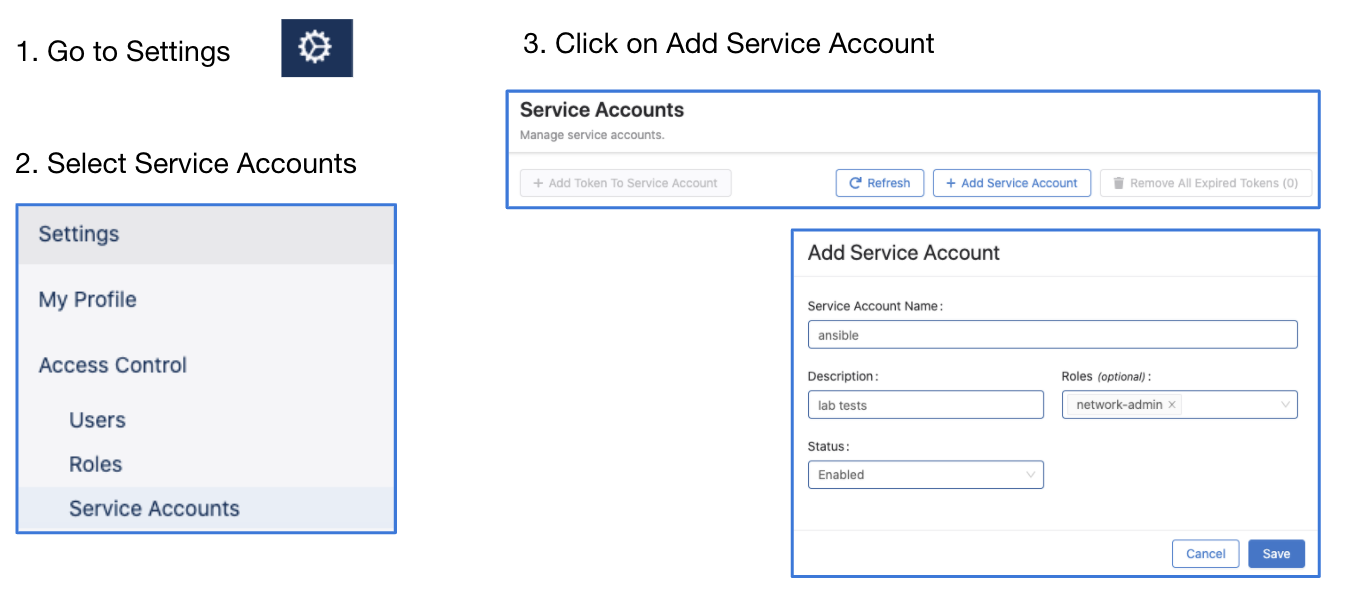
- Go to Settings and Tools → Access Control → Service Accounts → click
+ New Service Account
Account name: AVD
Description: "Automation with AVD"
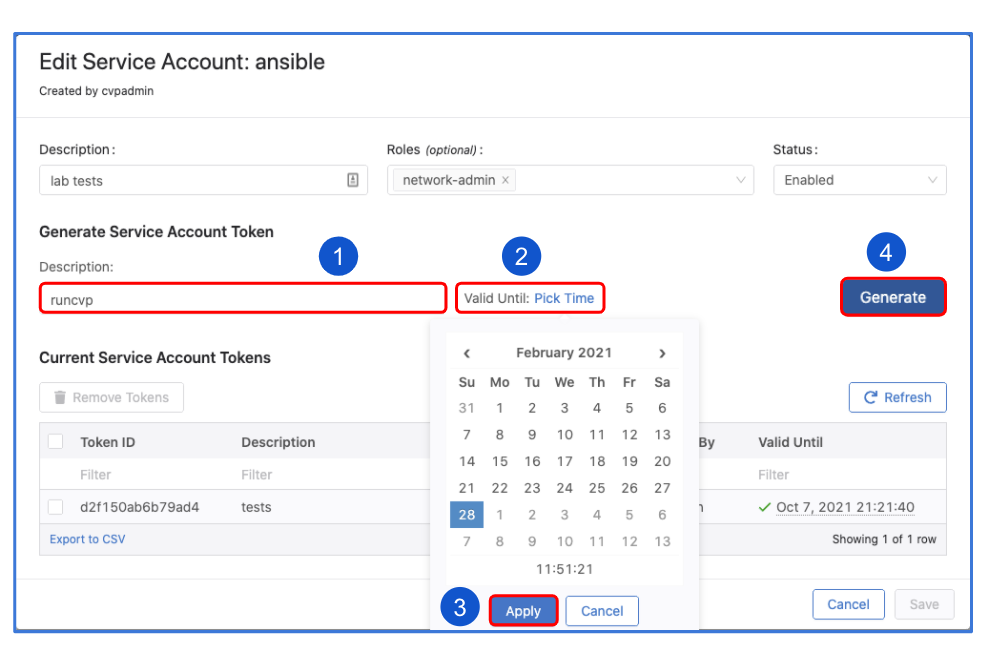
Give a description under "Generated Service Account Token"
Specify the "valid until" date.
Make sure to copy the generated password. You only get view it once.
Click "Save" to exit the dialogue box.
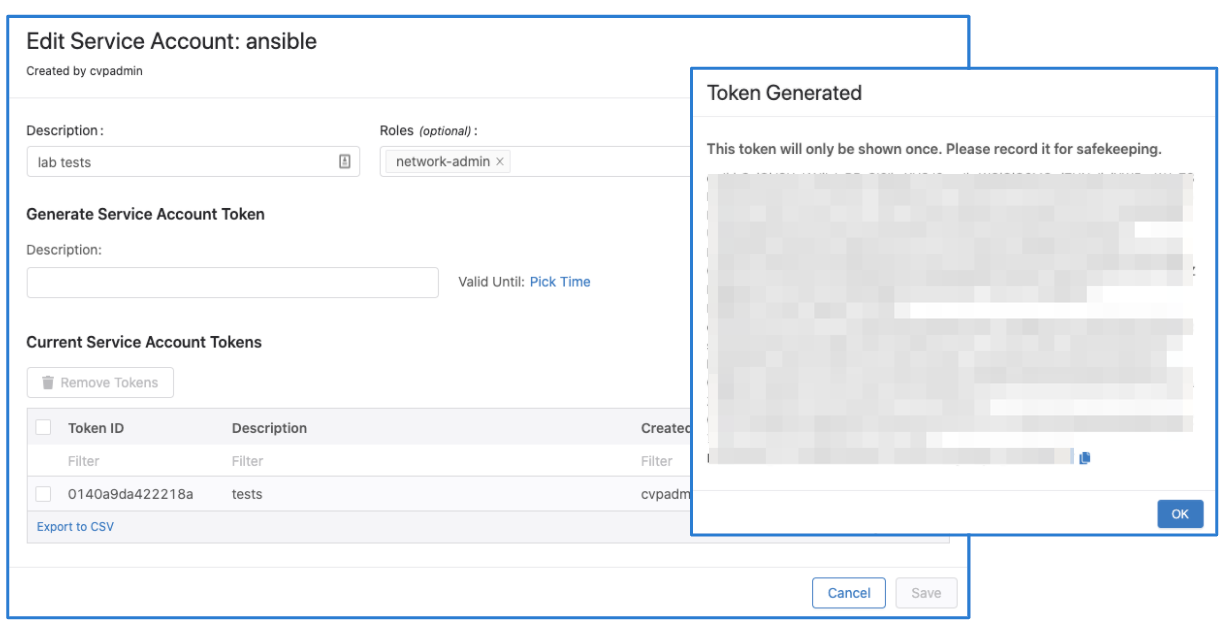
Note
The name of the service account must match a username configured to be authorized on EOS, otherwise device interactive API calls might fail due to authorization denial.
Proxy server support
The arista.avd.cv_deploy role supports connecting to CloudVision through an HTTP CONNECT proxy server, with or without basic authentication.
To enable the proxy, set proxy_host (port TCP/8080 will be used by default). If this variable is not defined, a proxy will not be used (default mode).
Warning
Authentication credentials (when used) are sent to the proxy server using HTTP Basic authentication over non-encrypted HTTP transport (credentials are only Base64 encoded, not encrypted). Credentials can be exposed by intercepting and analyzing raw TCP/IP traffic between AVD and Proxy server.
Please use AVD proxy authentication only when absolutely necessary. Always use other filtering and identification mechanisms (like HTTP filtering based on the client’s SRC IP, requested destination domains, etc.) to limit the security risks.
It is important to note that plain HTTP is used by AVD only for the initial CONNECT request to establish the tunnel with the CloudVision through proxy server. Once the TCP tunnel to CloudVision through proxy server is active, all subsequent AVD communication — including both REST and gRPC calls — is protected within a secure TLS session(s) established between AVD and CloudVision inside the TCP proxy tunnel.
Below settings allow modifying the default proxy-related behavior as needed. The values below are the default values.
# Set FQDN/IP of the HTTP CONNECT proxy server.
proxy_host: <str>
# Set target TCP port of the HTTP CONNECT proxy server.
proxy_port: 8080
# Set authentication username for the HTTP CONNECT proxy server.
proxy_username: <str>
# Set authentication password for the HTTP CONNECT proxy server.
proxy_password: <str>
Example of the configuration to use unauthenticated HTTP proxy using CONNECT method:
Example of the configuration to use authenticated HTTP proxy using CONNECT method:
proxy_host: proxy.local.domain
proxy_port: 3128
proxy_username: "avd_proxy_user"
proxy_password: "avd_proxy_password"
License
Project is published under Apache 2.0 License